
Hang out with your friends.Keep your own server.
Voice rooms, screen sharing, chat, games, music and a shared cinema. Your group’s evening in one desktop app, on a server you run.
Host your own- macOS 14+ · Apple Silicon
- Windows x64
- Open source · MIT
The everyday core
Walk into a room and start talking.
Voice, screen sharing and messages are the heart of Tayfa. All of them come with the one-command server install from day one.
Voice rooms
No need to call.
Whoever is in the room is already talking. Drop in, say hi, drop out. Moving to another page in the app does not end the call.
- Set each person’s volume anywhere from 0 to 200%
- Noise reduction and volume levelling
- Push-to-talk and your own shortcuts
Screen sharing
Put the game, the film or the slides on screen.
Share a screen or a single window, with its sound. Each viewer picks the picture quality that suits their connection.
- Change the screen, quality or sound without stopping the stream
- With your approval, a friend can use your mouse and keyboard
Chat
Make the plan in writing.
Channels, direct messages, files, reactions and polls. When something starts in a room, a card drops into the chat and you join from the conversation.
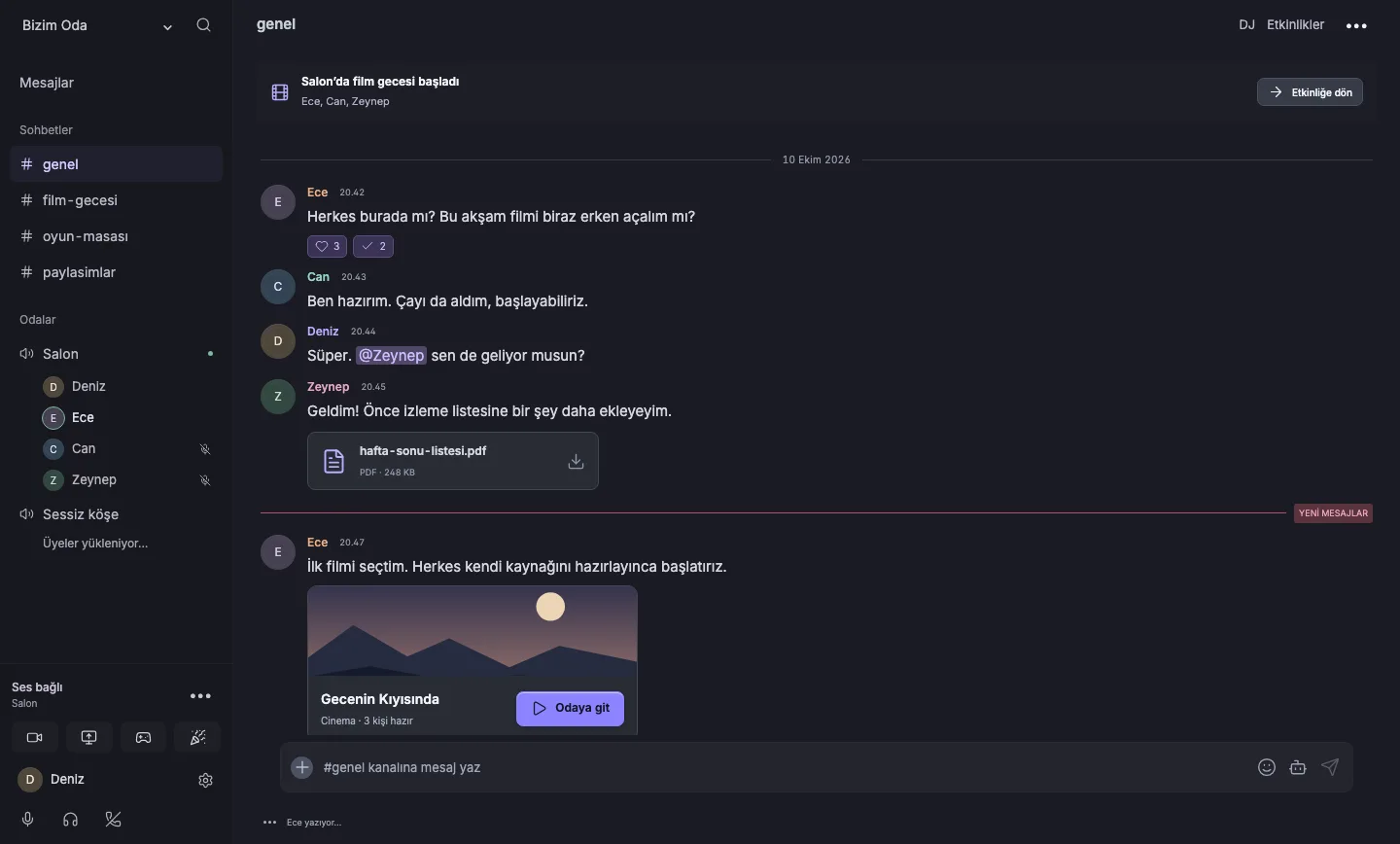
Evening plans
When talking isn’t enough.
A film, some music and a shared diary. All in the same app, with the same friends.
Cinema
Optional serviceSame film, same second.
A film started in the hall plays for everyone at once. When whoever has the remote skips ahead, it skips for everyone; each person picks their own subtitles. Unfinished episodes and the next one wait in the Continue row.
Tayfa provides no content. The community owner connects their own legal source to the hall. You can also open YouTube videos together.
DJ
Optional serviceYou pick the next song.
Put music on in the room, add songs to the queue, build shared playlists. Everyone in the room hears the same song and sets their own volume.
Watch diary
Optional serviceWhat did you watch, and with whom?
Every film or episode that plays in the hall for at least five minutes goes into the diary by itself. Everyone adds a rating and a review, marks spoilers, and saves picks to the watchlist.
What else is on the table
If the night goes on.
Games
- Pişti
- Okey
- 101
- Tavla
- Batak
- Blackjack
- Hold’em
Seven table games while the voice chat goes on. The server keeps the game state and tells you when it’s your turn, even on another page.
- Whiteboard
- Everyone draws on the same board with live cursors. Drag coloured notes around and snap them to the edges.
- Studio
- Make music together: shared projects, a timeline, piano roll, drum grid, mixer and WAV export.
- Soundboard
- Short sounds, each with an emoji. When someone plays one, the emoji rises on everyone’s screen.
- Entrance sound
- When you join a voice room, the people inside hear a short sound you picked. Anyone can mute it on their side.
Your own server
Your own server, with one command.
Tayfa has no central account that everyone signs in to. A community admin sets up the server and sends invite links; the link points to that server, and your account lives there.
- No central account
- Your account belongs to the community’s server. Different communities keep separate accounts and data.
- The admin owns the data
- The community admin decides on retention, deletion and backups. A backup takes one command.
- Encryption
- Voice and video are encrypted in transit. End-to-end encryption is not configured.
Chat, voice, screen sharing and shared activities come with the quick install. DJ and Cinema are optional and set up separately.
On your server, over SSH
curl -fsSL https://raw.githubusercontent.com/egemenmermer/tayfa.chat/main/deploy/install.sh | sudo bash
# a new invite for 3 people, valid for 2 days
sudo rooms invite --uses=3 --days=2
# services and outside reachability
sudo rooms status
# back up the database, files and settings
sudo rooms backup
Ports to open: 80 and 443 (HTTPS), 7881/tcp and 7882/udp (voice and video).
Rent a server
Ubuntu 22.04/24.04 or Debian 12, at least 2 GB of RAM, 4 GB recommended. x86_64 and ARM64 are supported.
Point your domain at it
Set the domain’s A record to the server. No domain? A free DuckDNS name works too.
Run the command
The script installs Docker, generates every password on the server and gets the HTTPS certificate itself.
Send the invite link
The installer prints your first invite link: valid for 7 days, for 10 people. Make more in the app or with a command.
Download
Get the app, open the invite link.
Downloading the app is free. To join a community you need its invite link, or an account on its server.
Version 0.1.18-rc.35 · 30 October 2026 · release candidate
Windows
Windows x64
Unsigned test build; Windows may show a warning during install.
iPhone
iOS 17 or later
Not on the App Store. Build it from the open source with your own Apple developer account and point it at your community’s server. It is in internal TestFlight testing with a community of friends. The interface is Turkish for now.
Tayfa used to be called ROOMS. For now, the downloaded file name still starts with ROOMS.
There is no desktop package for Linux; Linux runs the server side.
All releasesOpen source
Open code, MIT licence.
Tayfa’s own code is MIT licensed and on GitHub. The source contains no built-in server address or shared account. Issues and pull requests are welcome in English or Turkish.
How it works
Tayfa desktop
The app, built with Electron, React and TypeScript
Tayfa services
Access permissions and shared activities
Stoat
Accounts and chat; runs separately, unmodified
LiveKit
Real-time voice and video
FAQ
Questions

Tonight,on Tayfa.
Download the app and open the link a friend sent you. Or set up the server yourself and send the link.
Host your own